Posts

Showing posts with the label Linux

Setting cachedir with DNF5

On Fedora (and other systems that use DNF for package management), we can set the directory used by DNF for cache data. Combined with keepcache setting, this can be used to collect all RPM packages downloaded by DNF. Then one can just copy these files to another computer without Internet access and use them to install/update packages on that machine. The configuration file for DNF used to be /etc/dnf/dnf.conf . I used to have the following two settings in my dnf.conf file: [main] cachedir = /my/cache/dir/path keepcache = True But after I installed Fedora 41, which has DNF5 , I found that setting cachedir was not having any effect. Usually, when you do a ' sudo dnf update ' command, you could see repository data getting created in the cache directory. But for some reason, this was not happening. Digging around DNF5 documentation , I finally figured out the reason. For superuser, the cache directory needs to be set by system_cachedir setting and not cachedir . So my /etc...

CMake configuration for reproducible builds of C++ projects with gcc/Linux

This is a quick guide for configuring CMake such that every rebuild of the same C++ code generates bit-by-bit identical binaries. This is useful in verifying if a given binary is indeed generated from the given sources and comes in handy for configuration control. This article is not a detailed documentation on the reasons or mechanisms that cause binaries to differ from build to build nor the rationale behind the countermeasures explained in great detail. That information is already covered elsewhere and a few helpful links are provided in the end. This post is made because all of this information was not available in one place. In general, the same C++ code should generate the same executable (or library) every time it is compiled using the same build system on the same platform. But in practice, several factors cause the final binaries to differ. There are a few things developers need to take care of to avoid these: Eliminate differences due to build path. target_compile_options(...

qView - a simple, fast image viewer for Linux

Image
qView is a simple, minimalistic and fast image viewer for Linux, Windows and macOS. It's built using Qt and is GPL v3 licensed free software. It supports pretty much all features that one expects from a fast and no-nonsense image viewer. It has replaced Gwenview as the default image viewer on my KDE Plasma Fedora desktop. Gwenview is of course more feature-rich and fancier, but I like qView for simply viewing and cycling through images.

Qt - Enabling qDebug messages and Qt Creator

I have been struggling for the past two hours to get qDebug() messages from my Qt 5 application to show up on the 'Application output' pane in Qt Creator IDE on Linux. Finally I found a solution, thanks to a user on Qt IRC channel. To enable log messages in Qt, do the following: Edit ~/.config/QtProject/qtlogging.ini and make sure it has: [Rules] *.debug=true qt.*.debug=false With this, I was getting the messages when I run the application from a terminal. But Qt Creator was not showing the qDebug() messages. To have the messages displayed in Qt Creator, do the following: Qt creator > Tools > Options > Kits, select your kit, find Environment, click change and add: QT_ASSUME_STDERR_HAS_CONSOLE=1 This fixed the problem for me. I thought I should document the full process here as Google wasn't getting me good leads. My environment: Fedora 29 Linux x86-64 Qt 5.11.3 Qt Creator v4.7.2 References: https://bugzilla.redhat.com/show_bug.cgi?id=12272...

Fear and Loathing in KDE Land?

Full disclosure: My only contributions to KDE project are several bug reports and perhaps a few new users. So my qualifications to comment on the issue is of course almost non-existent. But hey, I've been a faithful KDE user for all these years, and so I think I have some right to make comments at least from a user's perspective. ------- There's been some discussions on KDE land regarding replacing Nepomuk (or Nepomuk-KDE for the politically correct) with a new project named Baloo . The Baloo project is headed by KDE developer Vishesh Handa, who apparently was very much involved in Nepomuk as well. Baloo wasn't announced officially to the 'public' till now, but thanks to recent Phoronix articles , it's been gaining some attention. The article titled "KDE's Nepomuk Doesn't Seem To Have A Future" went on to say: "It appears there isn't much of a future left to KDE's Nepomuk framework that was developed at a cos...

rpmbundle - Copy RPMs for offline installation

Installing Fedora (and most other free distros) on computers without a fast (and economical) Internet connection is a bit painful since most of the popular multimedia file formats aren't supported out of the box . Being a free distribution, Fedora only supports and includes free and open source software. Support for all the other patent encumbered formats are available from RPMFusion repository. However, you'll need a fast (and reasonably cheap) Internet connection to download several megabytes worth of RPM files from these repositories. I present here the steps and a small utility program for copying RPM files from a PC with Internet connection for offline installation at other computers. This can be used to update existing installations or to install new software on stand-alone PCs. Step 1 - Download RPMs The simplest way to harvest RPMs is to enable YUM's cache on the source machine. This way, everything YUM fetches on the machine will be available in...

Fedora 16 / Windows 7 - Dual booting with GRUB2

Image
Fedora 16 was released almost a month back. This is the first Fedora release to have switched to the GRUB2 boot loader. I had some trouble installing Fedora 16 - the boot loader won't get installed on my MBR since there wasn't enough space to accommodate the boot image. The details of my struggles can probably be the subject of another post. Here, it must suffice to say that I had nuked my first partition, containing Windows 7, to make sufficient space (unallocated sectors) at the beginning of the HDD for grub2 boot image. After installing F16, I reinstalled Windows 7 on to the first partition on the HDD. Everything was fine, except, unsurprisingly, that it replaced grub2 boot loader with its own. Getting back grub2 to boot Fedora was a matter of doing this: Boot using Fedora 16 DVD Select 'Troubleshoot' and use the 'rescue mode' Let Anaconda autodetect existing Linux installations, and when prompted, select your F16 installation from among the multi...

SATA driver - ata_piix - problem with Red Hat Enterprise Linux 5 Installer - SOLVED

I was trying to install RHEL 5.3 on one of the new industrial computers we had in our office. I had installed MS DOS 6.22, Windows 2000 and Windows XP on these machines without any issues. This PC model has Intel Core2Duo processor with an Intel main-board chipset. The RHEL 5.3 installer, unfortunately, was getting stuck in the very beginning with "loading ata_piix driver". Doing Ctrl+Alt+F4 took to a terminal that showed periodic attempts to access the SATA HDD with different modes (UDMA/133, UDMA/33 etc.), but nothing worked. In the BIOS, in 'Intergrated peripherals', there were three options for the SATA controller - IDE, AHCI and RAID , the default being "IDE". In addition, there's another setting "Enable legacy mode" that was set to "Disabled" by default. I tried enabling the Legacy mode and the installer worked fine. But after (and during the installation), I noticed that the system was running quite slow. It seemed disk access...

Shredding files from your hard disk

When you normally 'delete' a file from your hard disk, it's not actually removed from the disk. Instead, only the information that such a file exists is removed. The storage space occupied by the file is made available for reuse. It is therefore possible to recover the deleted files, as long as those disk areas are not overwritten. There are a variety of tools to recover deleted files. But this post is about deleting files permanently and thereby eliminating the possibility of recovery. One of my hard disks had failed and since it was under warranty, I wanted to return it to the service centre. I wanted to make sure that all files on the disk are destroyed. The following gives the steps to be taken to wipe-out files from the disk using a Linux machine. The shred utility The 'shred' program can be used to repeatedly over-write a file's contents so that it's nearly impossible to recover the original data. shred uses specially designed patterns that are writte...

Merging PDF files in Linux while preserving the links

I wanted to merge multiple PDF files on Linux, without messing up the links in the individual files. There was a Linux.com article on merging PDF files using Ghostscript and using pdfmeld (a commercial software). The Ghostscript method works, but completely messes the links up. Searching on Google also didn't return any instant pointers. But it did get me to pdftk . It's a really useful utility for meddling with PDF files. To merge two PDF files, the command is: pdftk 1.pdf 2.pdf 3.pdf cat output 123.pdf And to make it even better, links work flawlessly in the merged PDF files. Hooray! PS: I created the individual test files using OpenOffice Writer. They had navigational hyperlinks to sections inside the same files. Update: It seems there's a good GUI for pdftk - PDF Chain . I haven't used it yet, but people seem to be appreciating it.

Dual-booting Thunderbird

Image
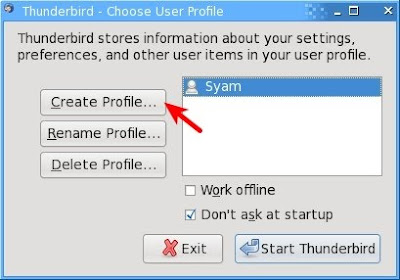
I've a Windows-Linux dual boot setup. I've retained my Windows installation mainly for my mother who keeps resisting the transition to Linux (by 'Linux', I do definitely mean 'GNU/Linux'). Anyway, after Outlook Express choked on her mailbox (full of funny photos and PowerPoint presentations, baby snaps and all those valuable info emails), I have succeeded in porting her to Mozilla Thunderbird. Hoorray! Anyway, that's not the purpose of this post. I've been using POP to fetch my email (both from Yahoo and GMail) with Thunderbird. I'd like to use my email system from both Windows and Linux. So, I've been using a handy Thunderbird setup for the past few years. So, I thought of documenting it in case anybody finds it useful. This page says - 'Mozilla applications store your personal settings, added extensions and themes, and user data such as bookmarks, passwords, cookies and mail in a "profile"' . So, the trick in having your mai...

Scheduling KTorrent

I just read a post titled Schedule your torrents in Ubuntu on Planet SMC . It uses the sleep command (not specific to Ubuntu) to delay the execution of the torrent client (Deluge). I've been using another method to schedule KTorrent for the past couple of years. I'll post it here, in case anybody finds it useful. There are three things to be done for 'autonomous' KTorrent (or perhaps any other client): Start the client program (KTorrent) at a particular time Make the program start downloading Exit the program gracefully The first problem can be addressed by the 'sleep' method, or using cron . I prefer the latter since I wish to start the downloader everyday. Here's how to do it. The command: crontab -e lets you edit your cron jobs. The vi-like editor allows you to specify the date/time and the command to be executed. For example, the following entry in crontab will execute the 'cp' command at 2:10AM everyday: 10 2 * * * cp /var/log/messages /mn...

Praise the lord.. for we have Free Software!

Well, GNU/Linux in particular. (and you can substitute whatever you deem appropriate for 'lord'). I'm sitting in my room with a friend's laptop (no, I'm not blogging using that.. it's in no useful shape, yet!), watching as Fedora 11 is getting installed. He had Windows Vista pre-installed on it, lots of unpartitioned space (reserved for Linux), and some messed up partition table. HP/Compaq, in their infinite wisdom, do not provide an operating system install disk (I like Dell better for that). It is the responsibility of the user to use their tool to generate 'rescue disks', should something go wrong with the computer. The Fedora installer (both F10 and F11) failed to read the partition tables and said the disk needed to be 'initialized', losing all data. So, we tried to fix the tables first. We took backup of all data and decided to re-install Windows first. I had no clue about what awaited me! 1. The 'restore to factory setup' only rest...

Building Qt 4.4 for RHEL 5

As explained here , I wanted to build RPMs for Qt 4.4 for Red Hat Enterprise Linux 5. Compiling from sources was taking way too much time and was not attracting any developer love. If you want to use Qt 4.4 with RHEL 5, you'll need an updated version of KDevelop ( > 3.4) too. And that requires an updated version of GDB (v6.8). So you'll need to find those RPMs as well. Building an RPM is apparently a complicated process and you'll find lots of articles online (some very dated). But there's a way to reuse the packaging generated for Fedora. That way, you don't have to mess with source archives, patches and write spec files from scratch. Getting the source packages Koji is Fedora Project's build system. You can checkout source packages from http://koji.fedoraproject.org/koji/ and use it to build on RHEL. Cool, huh? But be aware of possible compatibility issues. Using the search facility of Koji site, I downloaded the following src.rpm files. qt-4.4.0-11.fc10....

Remastering Red Hat Enterprise Linux 5 DVD

In my office, the Linux buzz is growing, with more and more engineers trying their hand at Qt programming. I've been helping people install Red Hat Enterprise Linux 5 (RHEL 5) and get started with Qt 4. RHEL 5.1 comes with older (aka stable, or proven , as we like to call in our industry) versions of Qt, KDevelop and GDB. So, to make things easier, I set out to customise an RHEL 5 DVD. My original plan was to create a kick-start file for easier installation. Then I became too ambitious and decided to customise the whole damn thing. After several days of meddling with rpms and xml files, I'm happy to announce SUCCESS!! This post is meant to be a guide to all those brave souls who wish to do the same. Fear not, comrades, it's not as difficult as it looks like. In fact, if you don't want to build any new RPMs, it's quite easy. You can reportedly use a tool called Revisor to easily customise a Fedora / Red Hat distribution. I'm no sure about the effectiveness of th...